1. iOS 전용 카카오 로그인 API 구현
기존에 WEB에서 사용할 카카오 소셜 로그인을 구현했었는데,
이는 백엔드 서버에서 카카오 인가 서버와 통신하는 방식입니다.
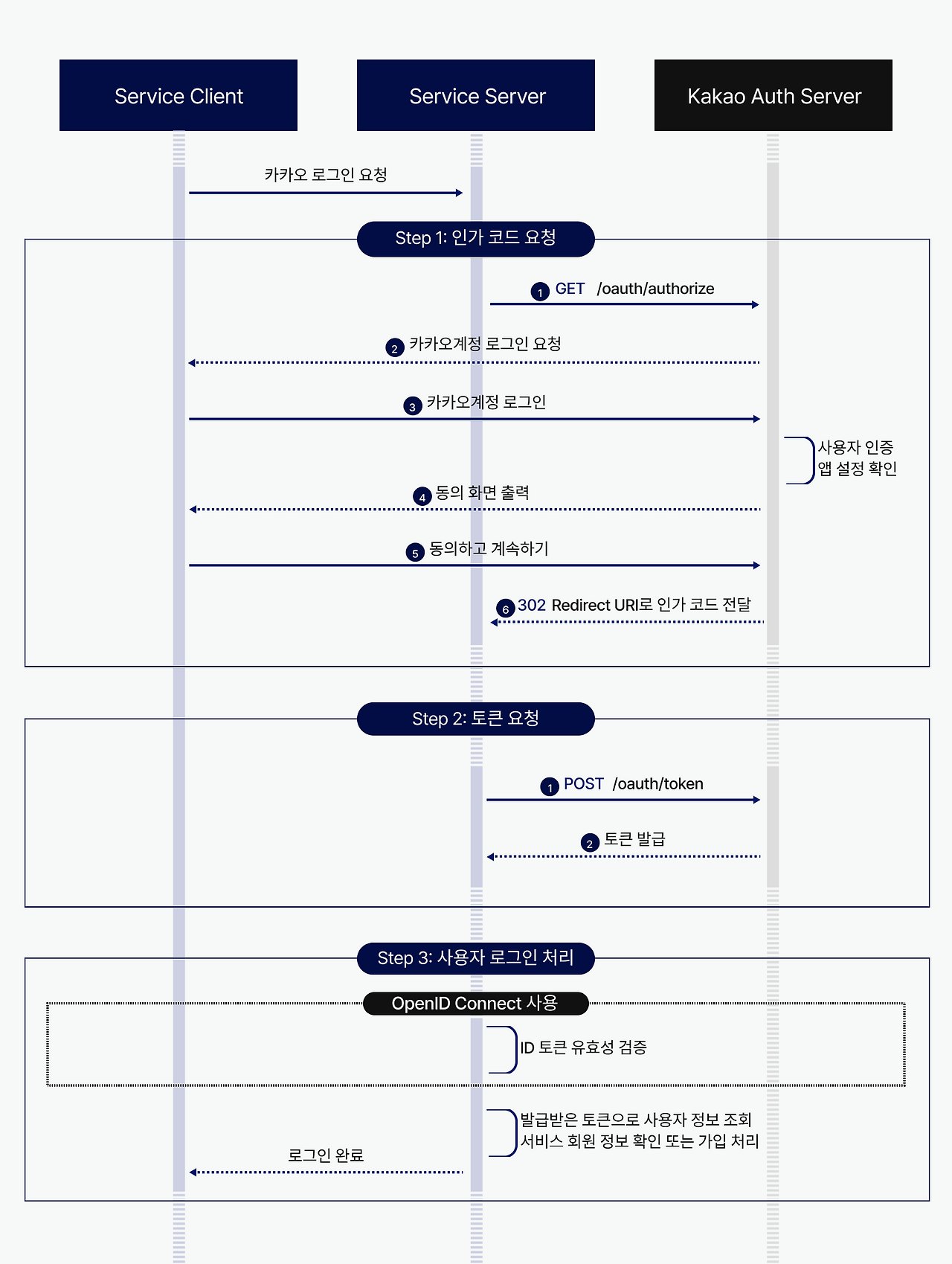
iOS에서는 카카오 SDK를 사용해 카카오 액세스 토큰까지 클라이언트단에서 발급이 가능합니다.
따라서 카카오 액세스 토큰을 검증하고, 자체 JWT 토큰을 발급만 해주면 간단하게 구현이 가능합니다.
WEB용 로그인에서는 OIDC를 사용했지만,
iOS측에서 기존에 액세스 토큰 기반으로 로그인을 구현해놓은 코드가 있다고 하여
카카오 액세스 토큰을 가지고 사용자 정보 조회 url로 요청을 보내 사용자 정보를 불러옵니다.
package com.techfork.domain.auth.service;

import com.techfork.domain.auth.dto.kakao.KakaoUserInfoResponse;
import com.techfork.domain.auth.exception.AuthErrorCode;
import com.techfork.global.exception.GeneralException;
import lombok.RequiredArgsConstructor;
import lombok.extern.slf4j.Slf4j;
import org.springframework.beans.factory.annotation.Value;
import org.springframework.stereotype.Service;
import org.springframework.web.reactive.function.client.WebClient;
import org.springframework.web.reactive.function.client.WebClientResponseException;

@Slf4j
@Service
@RequiredArgsConstructor
public class KakaoOAuthService {

    @Value("${spring.security.oauth2.client.provider.kakao.user-info-uri}")
    private String userInfoUrl;

    private final WebClient.Builder webClientBuilder;

    public KakaoUserInfoResponse getUserInfo(String accessToken) {
        try {
            return webClientBuilder.build()
                    .get()
                    .uri(userInfoUrl)
                    .header("Authorization", "Bearer " + accessToken)
                    .retrieve()
                    .bodyToMono(KakaoUserInfoResponse.class)
                    .block();
        } catch (WebClientResponseException e) {
            log.error("Failed to get Kakao user info. Status: {}, Response: {}",
                    e.getStatusCode(), e.getResponseBodyAsString());
            throw new GeneralException(AuthErrorCode.INVALID_KAKAO_ACCESS_TOKEN);
        } catch (Exception e) {
            log.error("Unexpected error while getting Kakao user info", e);
            throw new GeneralException(AuthErrorCode.KAKAO_API_ERROR);
        }
    }
}
2. 사용자 API 구현
단순히 사용자의 정보를 불러오고 수정할 수 있는 간단한 API를 구현했습니다.
이번에 PR을 작성할 때
두 개의 API 구현에 대하여 진행한 뒤에 커밋하고, 단위 테스트 구현 후 커밋, 통합 테스트 구현 후 커밋을 진행했습니다만
단위 테스트가 잘 짜여졌는지 1개의 커밋에서 볼 수가 없다는 점을 인지하여
다음부터는
1. API 구현 -> 단위 테스트 코드 작성 -> 커밋
2. 통합 테스트 구현 -> 커밋
위와 같은 방식으로 커밋을 진행할 예정입니다.
'프로젝트 > Techfork' 카테고리의 다른 글
| [26/01/28] 오늘의 개발 일지 - 웹 Apple 소셜 로그인 구현 (0) | 2026.01.29 |
|---|---|
| [26/01/27] 오늘의 개발 일지 - 검색 API 엔드포인트 통합 & 회원탈퇴 API 구현 & Activity 도메인 테스트 코드 작성 (0) | 2026.01.28 |
| [26/01/22] 오늘의 개발 일지 - 개발자 토큰 API 구현 및 Spring Security Testing 삽질 (2) | 2026.01.23 |
| [26/01/23] 오늘의 개발 일지 - baseUrl 문제 해결 및 쿠키 도메인 에러 해결 (0) | 2026.01.23 |
| [26/01/20] 오늘의 개발 일지 - CI에서 테스트 실행 및 통합 테스트 컨테이너 환경 개선 (1) | 2026.01.20 |